
Free Grade Calculator 2026: Weighted & Final Grades
Table of Contents
Free Grade Calculator 2026: Weighted & Final Grades
Use our free grade calculator to estimate your current class grade, calculate weighted categories, convert assignment and test scores into percentages, and determine the score you need on your final exam.
Enter the values listed in your syllabus or online gradebook to understand where you currently stand. This guide also explains point-based grading, weighted grades, final-exam calculations, grading scales, extra credit, GPA differences, and common calculation mistakes.
Last reviewed: August 2, 2026
Written by: CalculatorApp.me Finance Editorial Team
Editorial role: Personal Finance Editorial Team
Formula review: All formulas and worked examples were manually checked during the latest content update.
Quick answer: A grade calculator estimates your course percentage using either the total points you earned or the weighted categories listed in your syllabus. It can also calculate the score required on a remaining assignment or final exam.
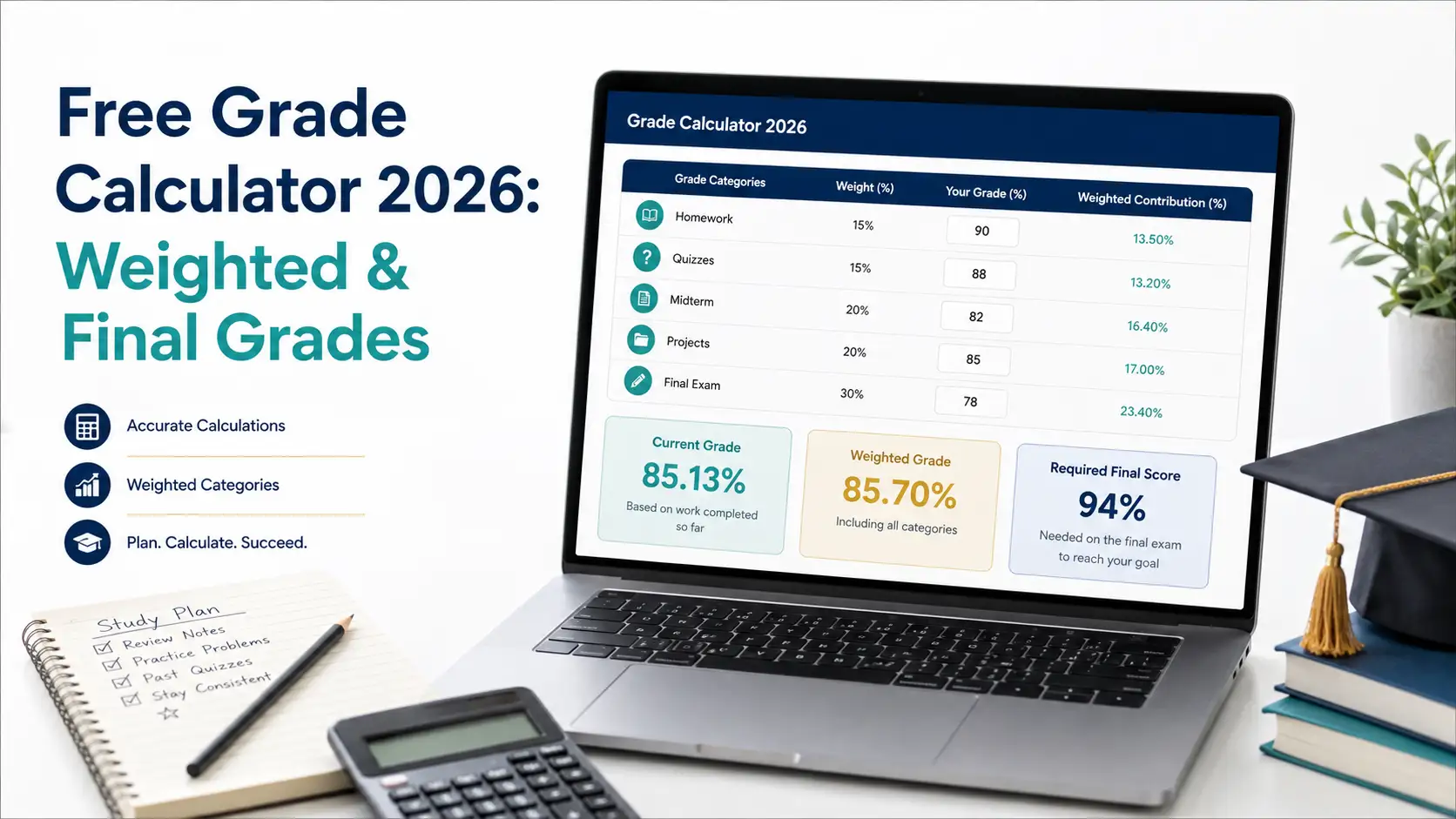
Use the free grade calculator to estimate your current grade, weighted course average, and the score needed on your final exam.
A modern laptop displays a grade calculator dashboard with Homework, Quizzes, Midterm, Projects, and Final Exam categories. The results show a current grade of 85.13%, a weighted grade of 85.70%, and a required final score of 94%.
What Is a Grade Calculator?
A grade calculator is an online tool that estimates your academic result from assignment, quiz, project, laboratory, midterm, and final-exam scores.
Depending on the structure of your course, it may use one of the following calculation methods:
Point-based grading: Total earned points are divided by total possible points.
Weighted grading: Each category contributes a different percentage to the final course grade.
Hybrid grading: Individual assignments use points, while the resulting category averages are weighted.
Students commonly use a grade calculator to answer questions such as:
What is my current class grade?
What percentage did I earn on an assignment?
How much does each category affect my final grade?
What score do I need on my final exam?
Can I still reach my target letter grade?
How will a missing assignment affect my average?
The result is an estimate. Your official grade may also depend on rounding, curves, extra credit, dropped assignments, score replacements, attendance, participation, or other instructor-specific policies.
Which Grade Calculator Should You Use?
The correct calculator depends on what you are trying to measure. Use the following comparison to choose the most appropriate tool.
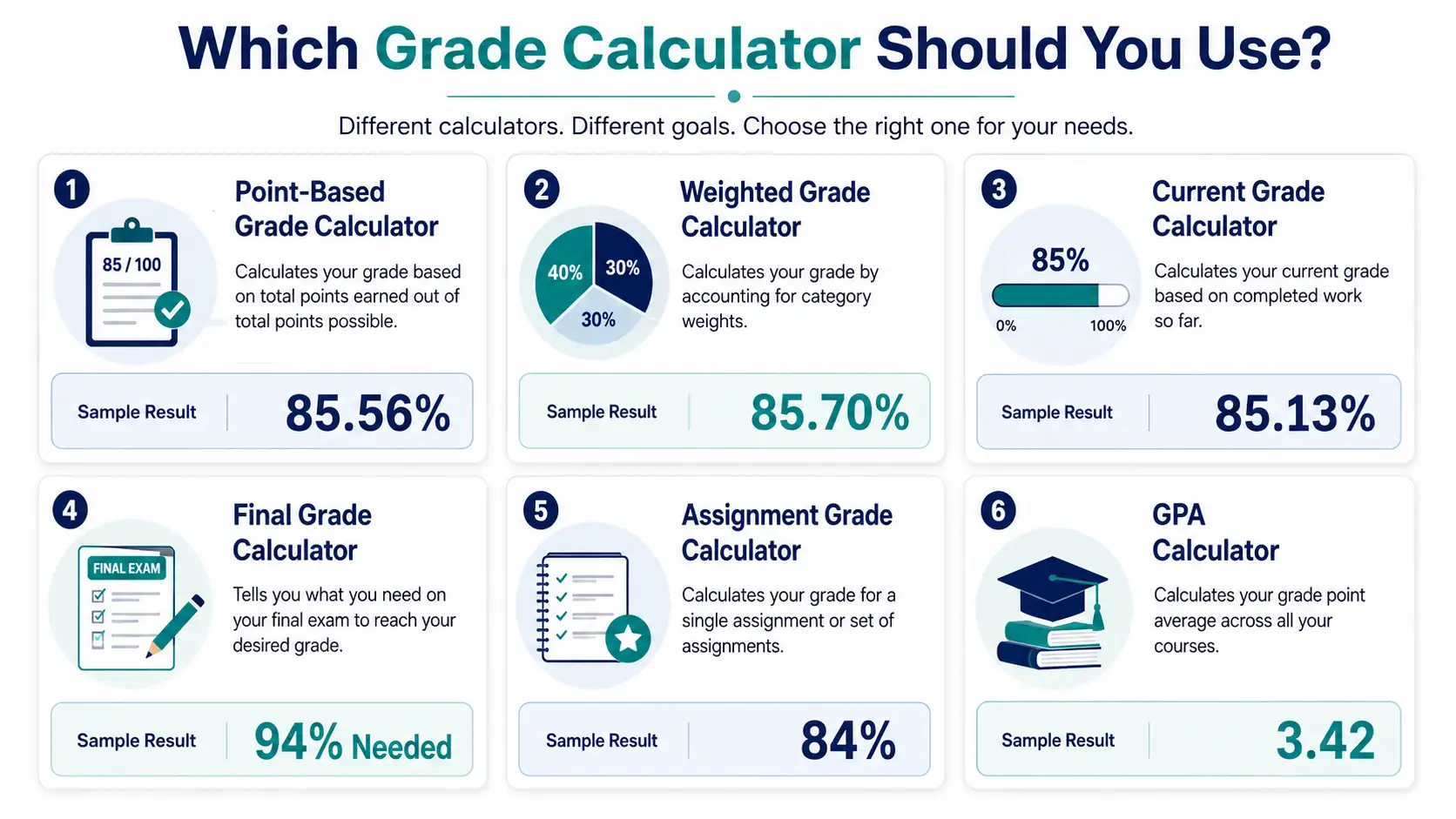
Choose the calculator that matches your goal, from checking one assignment to calculating a semester GPA.
Six comparison cards explain the purposes of point-based, weighted, current grade, final grade, assignment grade, and GPA calculators, with a sample result for each tool.
Calculator type | Best for | Information required | Result provided | Recommended tool |
|---|---|---|---|---|
Point-Based Grade Calculator | Courses where every assignment, quiz, and exam has a point value | Points earned and points possible | Current percentage based on total points | |
Weighted Grade Calculator | Courses divided into weighted categories | Category averages and percentage weights | Weighted course average | |
Current Grade Calculator | Checking your standing before all coursework is completed | Completed contributions and completed weights | Rescaled current grade | |
Final Grade Calculator | Finding the score required on a final exam | Current grade, completed-work weight, final weight, and target grade | Required final-exam score | |
Assignment Grade Calculator | Converting one assignment or test score into a percentage | Points earned and points possible | Assignment or test percentage | |
Combining grades from several courses | Course grades, grade points, and credit hours | Semester or cumulative GPA |
Important: A course grade calculator measures performance in one class. A GPA calculator combines results from multiple classes and may account for credit hours. These tools should not be treated as interchangeable.
How the Free Grade Calculator Works
Before entering your scores, check whether your course uses points, weighted categories, or a combination of both. This information normally appears in your syllabus or online gradebook.
Identify the grading method. Determine whether your course is point-based, weighted, or hybrid.
Collect your scores. Gather the assignments, quizzes, projects, tests, and exams that have already been graded.
Add the points or weights. Use the exact values listed in your course documents.
Enter your target grade. This is required when calculating a future assignment or final-exam score.
Review the result. Compare the estimate with your syllabus and official gradebook.
Use the Percentage Calculator when you need to convert raw points into a percentage before adding the score to your course calculation.
Point-Based vs. Weighted Grading
Point-based and weighted grading systems calculate course performance differently. Understanding which system your instructor uses is essential for producing an accurate estimate.
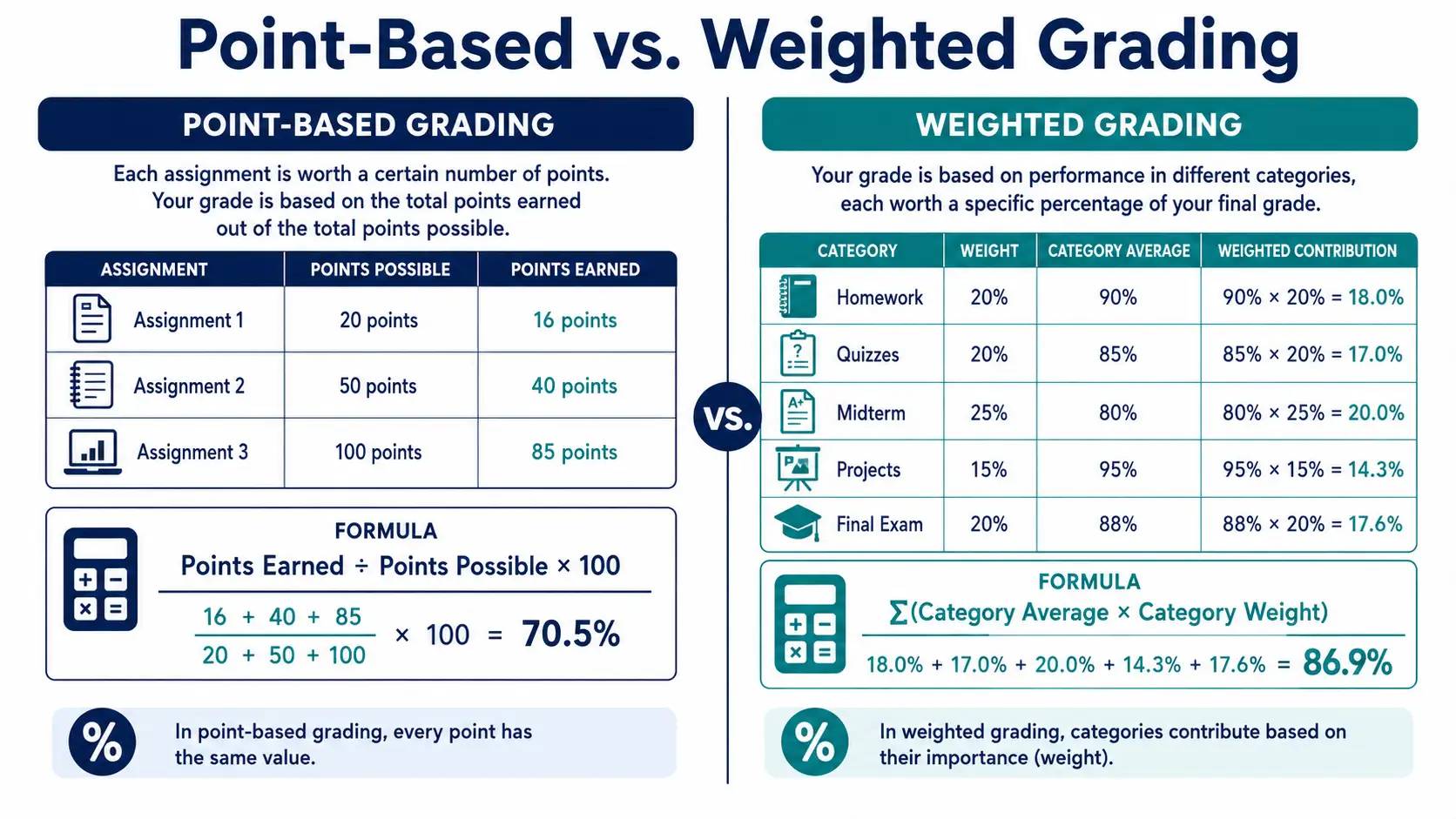
Point-based grading uses total earned points, while weighted grading applies different percentages to each course category.
This two-column infographic compares point-based grading with weighted grading. It shows how total points and category weights are used to estimate a course grade.
Feature | Point-based grading | Weighted grading |
|---|---|---|
Main formula | (Points earned ÷ points possible) × 100 | Σ(Category average × category weight) |
What controls the impact? | The number of points assigned to each item | The percentage assigned to each category |
Common use | Assignments and tests with fixed point totals | Courses divided into homework, quizzes, projects, and exams |
Main calculation risk | Leaving out an item or using the wrong possible-point total | Using incorrect category weights |
Best source of information | Your gradebook and assignment instructions | Your syllabus and official category breakdown |
In a point-based course, a 100-point exam affects your grade more than a 10-point homework assignment. In a weighted course, the assigned category percentage determines the effect. For example, an exam category worth 40% has more influence than homework worth 10%.
How to Calculate a Point-Based Grade
A point-based grade calculator adds all earned points and divides them by all possible points.
Formula:
Grade percentage = (Total points earned ÷ Total points possible) × 100
Point-Based Grade Example
Coursework | Points earned | Points possible |
|---|---|---|
Assignments | 180 | 200 |
Quizzes | 45 | 50 |
Exams | 160 | 200 |
Total | 385 | 450 |
Calculation:
(385 ÷ 450) × 100 = 85.56%
Your estimated point-based course grade is 85.56%. The corresponding letter grade depends on the scale used by your institution or instructor.
How to Calculate a Weighted Grade
A weighted grade calculator multiplies each category average by its assigned percentage weight and then adds the results.
Formula:
Weighted grade = Σ(Category average × Category weight)
Convert percentage weights into decimals before calculating:
10% becomes 0.10
20% becomes 0.20
25% becomes 0.25
40% becomes 0.40
Weighted Grade Example
Category | Average | Weight | Calculation | Contribution |
|---|---|---|---|---|
Homework | 90% | 20% | 90 × 0.20 | 18.00 |
Quizzes | 84% | 20% | 84 × 0.20 | 16.80 |
Midterm | 78% | 25% | 78 × 0.25 | 19.50 |
Projects | 92% | 15% | 92 × 0.15 | 13.80 |
Final exam | 88% | 20% | 88 × 0.20 | 17.60 |
Total weighted grade | 85.70% | |||
The estimated weighted course grade is 85.70%.
The mathematical principle behind this calculation is a weighted mean. OpenStax provides additional background on how weighted averages are calculated.
How to Calculate Your Current Class Grade
A current grade calculator estimates your performance using only the coursework completed so far. This is useful when a final exam, major project, or another weighted category has not yet been graded.
Using the previous weighted example, assume that the final exam has not been completed.
Completed weighted contributions: 18.00 + 16.80 + 19.50 + 13.80 = 68.10
Completed category weight: 0.20 + 0.20 + 0.25 + 0.15 = 0.80
Current-grade formula:
Current grade = Completed weighted contributions ÷ Completed category weight
68.10 ÷ 0.80 = 85.125%
Rounded to two decimal places, your current class grade is approximately 85.13%.
Check whether your online gradebook automatically rescales incomplete categories. Some systems exclude empty categories, while others temporarily display them as zero.
What Grade Do You Need on Your Final Exam?
A final grade calculator estimates the final-exam score required to reach your target course grade.
You normally need four values:
Your current grade
The percentage of the course already completed
The weight of the final exam
Your target course grade
Required final-exam formula:
Required final score = (Target grade − Current grade × Completed-work weight) ÷ Final-exam weight
Enter the completed-work and final-exam weights as decimals. For example, 75% becomes 0.75 and 25% becomes 0.25.
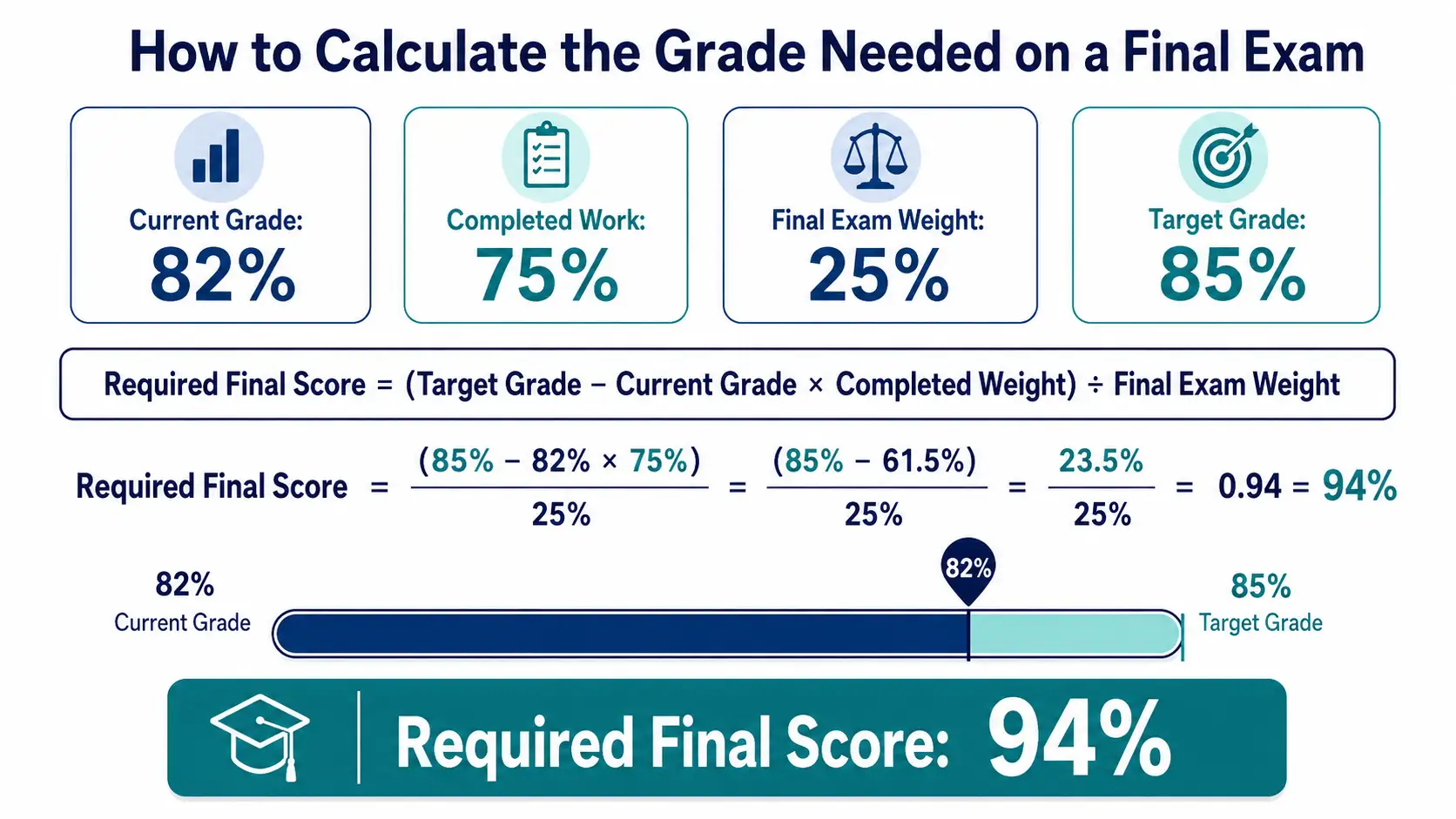
A student with an 82% current grade needs 94% on a final worth 25% to reach an 85% course grade.
The infographic uses a current grade of 82%, completed coursework of 75%, a final-exam weight of 25%, and a target grade of 85% to calculate a required final-exam score of 94%.
For a focused walkthrough, read Calculate What Score You Need on Your Final.
Final Grade Example 1
Current grade: 82%
Completed-work weight: 75% or 0.75
Final-exam weight: 25% or 0.25
Target course grade: 85%
Calculation:
(85 − 82 × 0.75) ÷ 0.25
(85 − 61.50) ÷ 0.25
23.50 ÷ 0.25 = 94%
You need approximately 94% on the final exam to finish the course with an 85% grade.
Verify the Result
(82 × 0.75) + (94 × 0.25)
61.50 + 23.50 = 85%
Substituting the required score back into the weighted-grade formula confirms the result.
Final Grade Example 2
Current grade: 74%
Completed-work weight: 70% or 0.70
Final-exam weight: 30% or 0.30
Target course grade: 80%
Calculation:
(80 − 74 × 0.70) ÷ 0.30
(80 − 51.80) ÷ 0.30
28.20 ÷ 0.30 = 94%
You need approximately 94% on the final exam to reach an 80% course grade.
How to Interpret Your Required Score
Required score | Meaning |
|---|---|
Below 0% | You have already secured your target based on the entered values. |
0%–99.99% | Your target may be reached through the final exam. |
Exactly 100% | You need a perfect final-exam score. |
Above 100% | The target normally cannot be reached through the final exam alone. |
A required score above 100% may become possible only if the course offers extra credit, a curve, grade replacement, dropped assignments, or another adjustment.
How to Calculate Test and Assignment Grades
An assignment grade calculator converts earned points into a percentage.
Formula:
Assignment percentage = (Points earned ÷ Points possible) × 100
Score | Calculation | Percentage |
|---|---|---|
42 out of 50 | (42 ÷ 50) × 100 | 84% |
78 out of 100 | (78 ÷ 100) × 100 | 78% |
17 out of 20 | (17 ÷ 20) × 100 | 85% |
If an exam includes partial credit, multiple sections, bonus points, or a curve, follow the scoring method provided by your instructor.
How a Grade Scale Calculator Works
A grade scale calculator converts a percentage into a letter grade. However, letter-grade boundaries are not universal. They may differ by school, university, country, department, programme, course, and instructor.
Example grading scale only:
Letter grade | Example percentage range |
|---|---|
A | 90%–100% |
B | 80%–89.99% |
C | 70%–79.99% |
D | 60%–69.99% |
F | Below 60% |
This table is an example, not a universal standard. Always use the official scale shown in your syllabus or institutional policy.
How Extra Credit, Missing Work, and Dropped Scores Affect Your Grade
Special grading rules can change your official result even when the basic calculation is correct.
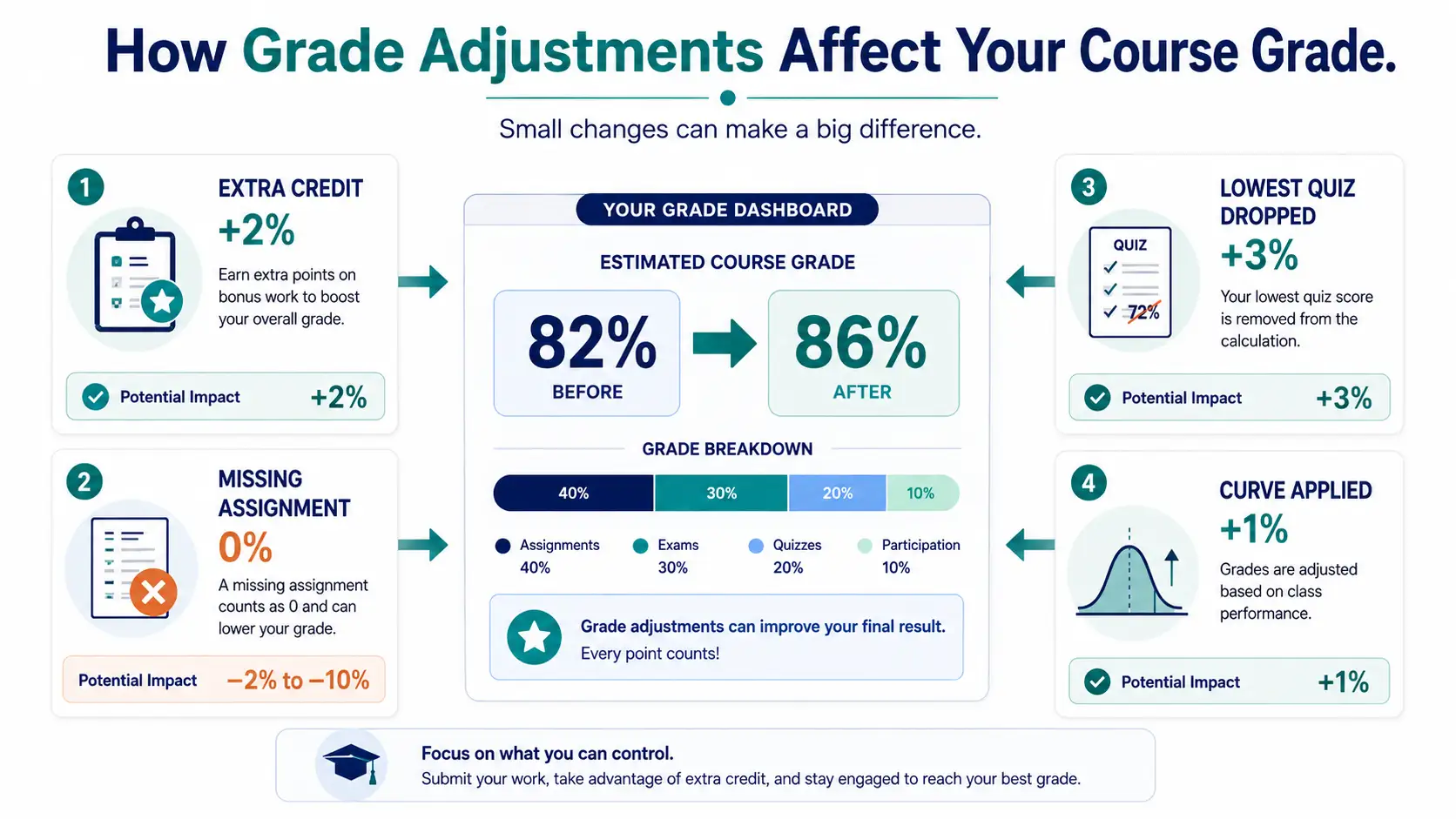
Extra credit, missing assignments, dropped scores, and grading curves can significantly change an estimated course grade.
A central grade dashboard illustrates how extra credit, a missing assignment, a dropped quiz, and a grading curve may affect a student’s result. The example shows an estimated grade changing from 82% to 86%.
Extra credit: Bonus points may be added to one assignment, a category, or the course total.
Missing assignments: Some gradebooks count missing work as zero, while others exclude it temporarily.
Ungraded work: Your displayed current grade may change once pending assignments are entered.
Dropped scores: The lowest quiz, homework, or test score may be removed.
Score replacement: A final exam may replace a lower midterm grade.
Attendance and participation: These categories are easy to overlook in manual calculations.
Curved grades: An instructor may adjust scores after reviewing class performance.
Rounding: Grades may be rounded per assignment, per category, or only after the final calculation.
Changed weights: Category weights may change when an assignment or exam is cancelled.
High-School, College, and University Grade Calculations
A high-school grade calculator commonly focuses on course percentages, semester grades, honours classes, AP or IB courses, and weighted versus unweighted GPA.
A college or university grade calculator may also account for:
Credit hours
Laboratory work
Attendance and participation
Projects and presentations
Course curves
Programme-specific minimum grades
Midterm and final-exam weights
The mathematical method may be similar, but official policies can differ considerably. Copy the weights, points, and grading scale directly from your syllabus.
For a deeper explanation of advanced-course weighting, read the Weighted and Unweighted GPA Guide.
Course Grade vs. GPA
A course grade measures your performance in one class. GPA combines results from multiple courses and may give more influence to classes with higher credit values.
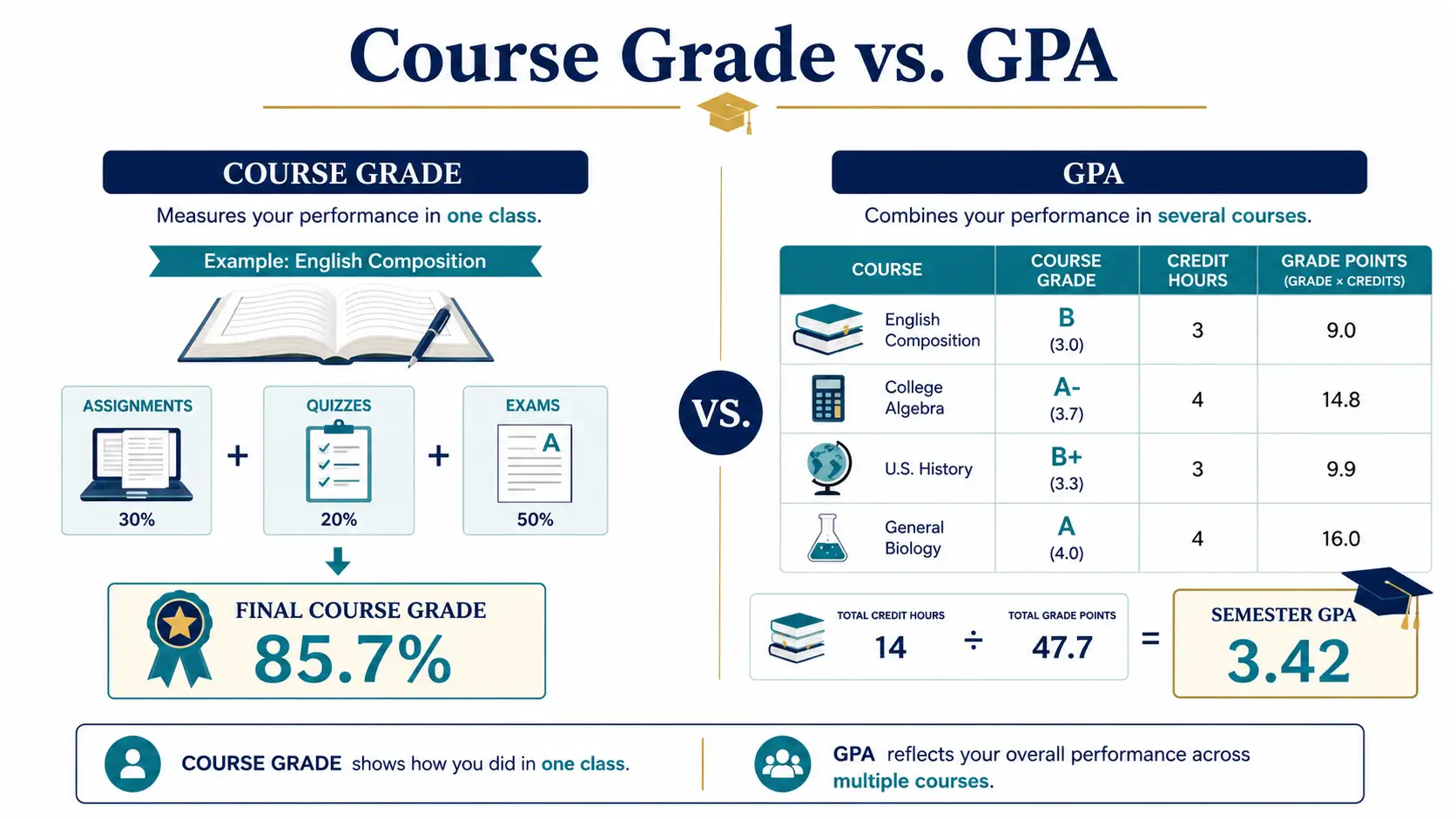
A course grade measures performance in one class, while GPA combines results from several courses and credit hours.
This comparison infographic shows how assignments, quizzes, and exams contribute to one course grade. It also demonstrates how grades from several courses may be combined with credit hours to calculate a semester GPA.
Calculation | What it measures | Recommended tool |
|---|---|---|
Course grade | Your result in one subject | Grade calculator |
Semester GPA | Your combined result for one academic term | GPA calculator |
Cumulative GPA | Your combined result across several academic terms | Cumulative GPA calculator |
Use the GPA Calculator to calculate grade points across several courses. You can also review the GPA Calculation Guide or the Complete GPA and Academic Planning Guide.
For additional institutional context, review the National Center for Education Statistics explanation of how GPA is calculated and College Board’s guide to calculating GPA on a 4.0 scale.
Common Grade-Calculation Mistakes
Small input errors can produce a result that looks reasonable but does not match the official grade.
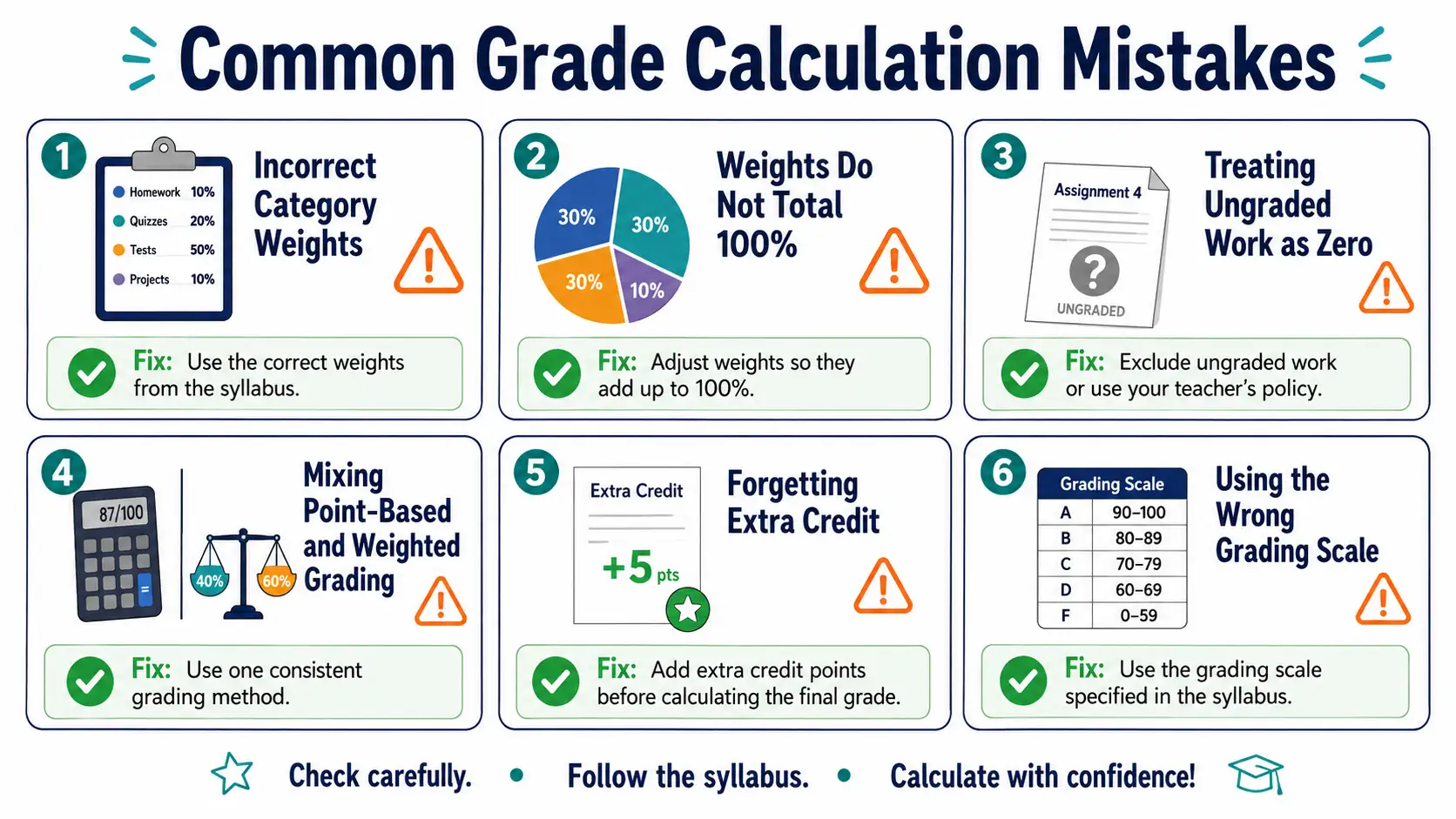
Avoid incorrect weights, missing categories, ungraded zeros, and other common mistakes that can distort your grade estimate.
The infographic highlights incorrect category weights, weights that do not total 100%, ungraded work counted as zero, mixed grading methods, forgotten extra credit, and an incorrect grading scale. A recommended correction is shown for each mistake.
Using the wrong grading method: Confirm whether your course is point-based, weighted, or hybrid.
Entering weights as whole numbers: Convert 25% to 0.25 when calculating manually.
Leaving out a category: Check for attendance, participation, laboratories, or final projects.
Using weights that do not total 100%: Review the official category breakdown.
Counting ungraded work as zero: Confirm how your gradebook handles pending assignments.
Ignoring dropped scores: Apply the course’s drop rule before calculating the category average.
Forgetting extra credit: Add bonus points according to the instructor’s method.
Using a generic letter-grade scale: Follow the official scale for your course.
Confusing a course grade with GPA: Use a GPA calculator for multiple courses.
Ignoring rounding rules: Small differences can appear depending on when rounding is applied.
Treating an estimate as official: The instructor’s records determine the final result.

A university student uses an online weighted grade calculator to review coursework and plan for the final exam.
A focused university student uses an online grade calculator in a bright study environment. The laptop screen displays weighted categories for homework, quizzes, projects, and the final exam.
How to Improve Your Grade Before Finals
Once you know your current standing, focus on actions that can make a measurable difference.
Prioritize high-weight categories. Improving an exam category worth 40% normally matters more than improving homework worth 10%.
Complete recoverable work. Submit missing assignments, revisions, or corrections when your instructor permits them.
Compare realistic scenarios. Calculate a likely score, a best-case score, and the minimum score needed to pass.
Review previous feedback. Identify the question types and topics where you regularly lose points.
Use active study methods. Practise retrieval, solve sample questions, and review mistakes instead of only rereading notes.
Cornell University provides additional guidance on effective final-exam study strategies.
How We Calculate and Verify Grade Results
This guide uses standard arithmetic and weighted-average methods. Every example follows one of these three formulas.
Point-Based Calculation
Grade percentage = (Total points earned ÷ Total points possible) × 100
Weighted-Grade Calculation
Weighted grade = Σ(Category average × Category weight)
Required Final-Exam Calculation
Required final score = (Target grade − Current grade × Completed-work weight) ÷ Final-exam weight
Percentage weights are converted into decimals before calculations are performed. Worked examples are verified by substituting the result back into the original formula.
The calculator and examples cannot automatically account for every instructor-specific rule, including curves, dropped scores, extra credit, grade replacement, attendance penalties, or hidden gradebook precision.
Who This Guide Is For
This guide is intended for:
High-school students calculating current or semester grades
AP, IB, and honours students tracking weighted courses
College and university students planning for final exams
Parents helping students understand course progress
Teachers checking point-based or weighted examples
Academic advisers explaining the difference between course grades and GPA
The guide covers common calculation methods, but each institution may apply different grading scales and academic policies.
Editorial and Accuracy Standards
We aim to keep this guide mathematically accurate, clear, and useful. Our review process includes:
Checking each formula for correct mathematical structure
Recalculating all worked examples
Confirming that percentage weights are converted correctly
Distinguishing course grades from GPA calculations
Avoiding claims that one grading scale applies to every institution
Linking to relevant educational and institutional sources
Reviewing the article when calculator functionality or cited resources change
Corrections should be documented in the article update history. Readers should also have a clear method for reporting a calculation problem or outdated reference.
Key Takeaways
For point-based grading, divide earned points by possible points and multiply by 100.
For weighted grading, multiply each category average by its weight and add the contributions.
A current grade calculator can rescale the categories completed so far.
A final grade calculator determines the exam score needed to reach a target course grade.
Grading scales, curves, extra credit, dropped scores, and rounding policies can change the official result.
A course grade measures one class, while GPA combines results from multiple courses.
Frequently Asked Questions
How do I calculate my current class grade?
Calculate your current class grade using the method listed in your syllabus. In a point-based course, divide total points earned by total points possible and multiply by 100. In a weighted course, add the completed category contributions and divide by their combined weight. Do not count ungraded work as zero unless your instructor or gradebook applies that rule.
What grade do I need on my final exam?
Use the formula: required score = (target grade − current grade × completed-work weight) ÷ final-exam weight. For example, with an 82% current grade, a final worth 25%, and an 85% target, you need 94% on the final. Confirm that your current grade represents only completed coursework before applying the formula.
How does a weighted grade calculator work?
A weighted grade calculator multiplies each category average by its assigned weight and adds the results. A homework average of 90% in a category worth 20% contributes 18 points to your final percentage. Repeat the calculation for quizzes, projects, exams, and other categories. Category weights should normally total 100% unless your syllabus states otherwise.
Can my final exam lower my overall grade?
Yes. A final exam can lower your overall result when your exam score is below your current course average. For example, if your current grade is 88%, completed coursework is worth 70%, and you score 70% on a final worth 30%, your final course grade becomes 82.6%. The size of the change depends on the final exam’s weight.
What if my category weights do not add up to 100%?
Check your syllabus for a missing category such as participation, attendance, laboratory work, or a final project. A category may also be temporarily excluded because it has no graded work. Do not adjust the weights yourself unless your course instructions explain how they should be rescaled. Ask your instructor if the listed weights still do not total 100%.
How do I calculate an assignment or test grade?
Divide the points earned by the total possible points and multiply by 100. A score of 42 out of 50 equals 84% because (42 ÷ 50) × 100 = 84. If the assignment includes bonus points, partial credit, several sections, or a curve, follow the scoring method provided by your instructor.
How does extra credit affect my final grade?
The effect depends on where the extra credit is applied. In a point-based course, bonus points may increase your earned total without increasing the possible total. In a weighted course, extra credit may raise one category average rather than the overall course grade directly. Check whether the bonus applies to an assignment, category, exam, or course total.
What score do I need to raise my letter grade?
First identify the percentage needed for the next letter grade. Then use the weight of your remaining assignment or final exam to calculate the required result. For example, if you have 88%, an A begins at 90%, and the final is worth 20%, you need 98% on the final. Always use your institution’s official letter-grade boundaries.
Is a grade calculator completely accurate?
A grade calculator can be mathematically accurate for the information entered, but it may not reproduce every course rule. Rounding, curves, dropped scores, attendance, grade replacement, missing assignments, extra credit, and hidden gradebook precision may produce a different official result. Use the calculation for planning and confirm the final grade with your syllabus or instructor.
What is the difference between a course grade and GPA?
A course grade represents your performance in one class. GPA combines grades from multiple courses and often gives more influence to classes with more credit hours. Some high schools also add extra weight for honours, AP, or IB courses. Use a course grade calculator for one class and a GPA calculator for your overall academic average.
About the Author
Written by: CalculatorApp.me Finance Editorial Team
Role: Personal Finance Editorial Team
The CalculatorApp.me Finance Editorial Team creates and fact-checks calculation-based guides designed to make numerical concepts easier to understand. For this article, the grade formulas and worked examples were checked for mathematical consistency.
Content Review
Mathematical review: Grade formulas and worked examples were manually recalculated during the August 2, 2026 update.
Independent academic reviewer: Not currently listed.
Do not claim that this article was reviewed by a teacher, professor, mathematician, or education specialist unless a qualified person has genuinely completed the review.
Sources and Further Reading
These sources provide supporting information about weighted averages, GPA methods, and exam preparation. Your institution’s official syllabus, academic handbook, gradebook, or instructor remains the primary authority for your course grade.
Limitations of the Grade Calculator
The calculated result may differ from the official grade when a course includes:
Curved exams or final grades
Dropped or replaced assignments
Extra-credit rules
Attendance or participation adjustments
Category averages calculated from hidden decimal values
Instructor-specific rounding
Temporarily excluded categories
Different treatment of missing and ungraded work
Minimum examination requirements
Academic penalties not represented as percentages
Use the calculator as a planning tool. Confirm official results through your course gradebook, syllabus, instructor, or institution.
This calculator provides an estimate based on the values entered. Your official grade may differ because of rounding rules, grading curves, dropped assignments, extra credit, attendance policies, category changes, or instructor-specific methods. Always confirm your results with your syllabus, teacher, or institution.
Calculate Your Grade
Use the Free Grade Calculator to calculate your current percentage, weighted course grade, assignment result, or required final-exam score.
Report an Error
If you find a calculation error, broken link, or unclear explanation, contact our editorial team at support@calculatorapp.me. Include the page URL, the calculation or statement in question, and the correction you recommend.
In-Depth Guides
Dive deeper with our comprehensive guides on this topic:
Frequently Asked Questions
Our Methodology
All Grade Calculator content on CalculatorApp.me is reviewed by subject-matter experts, cross-referenced with official sources, and updated regularly for accuracy. Our formulas and data are verified against industry standards and government publications.
Jordan Hayes
Verified AuthorPersonal Finance Content Strategist
Jordan is a personal finance content strategist with 9+ years writing about mortgages, retirement, tax strategy, and budgeting. Every guide is cross-referenced with IRS publications, Federal Reserve data, and CFPB guidance to make complex calculations accessible. Editor at CalculatorApp.me.
Found this helpful? Share it!
Stay Updated
Get notified when we launch new calculators and features.
No spam. Unsubscribe anytime.